Trust In Quality With Us
Fiber Laser Marking Machine
Showing all 3 results
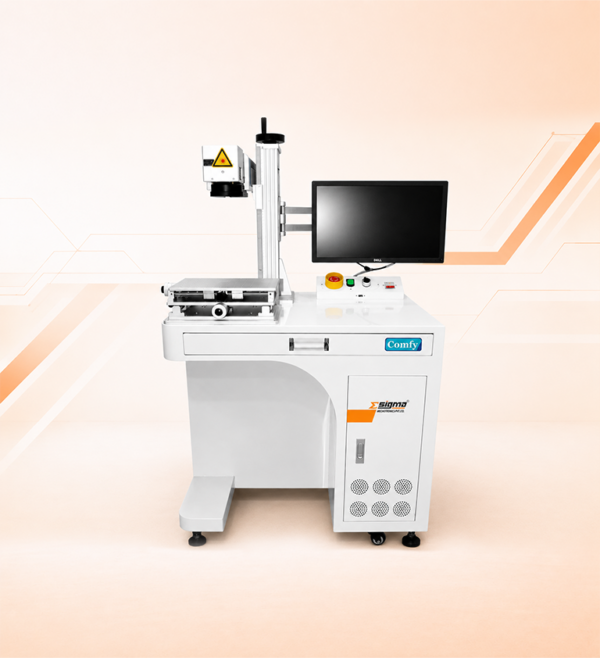
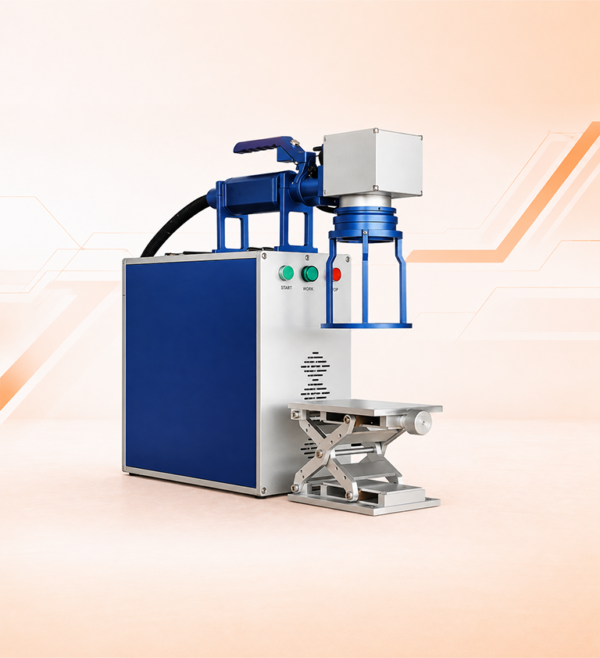
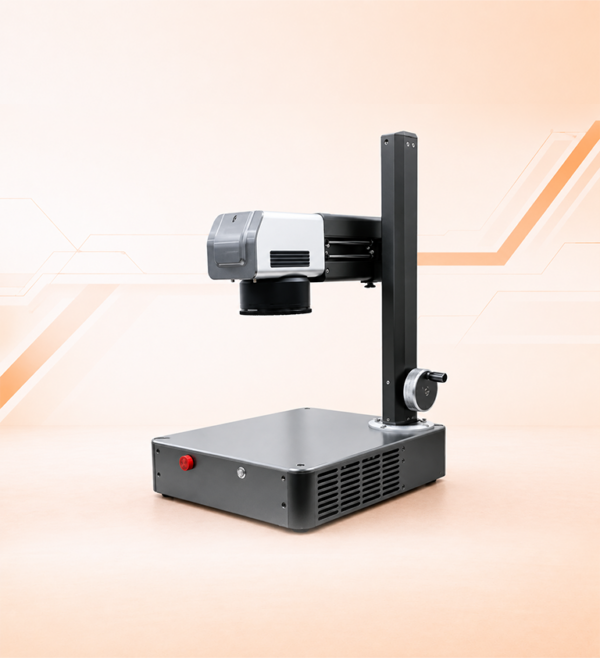
Fiber Laser Marking Machines – Desktop, Hand Held and Portable, 20 W to 50 W
A fiber laser marking machine marks metal permanently with a pulsed laser beam. Two fast mirrors steer the beam across the part, and the surface itself is engraved, darkened or stripped of its coating, so there is no ink, label or stencil to wear off. Sigma Mechotronics Pvt. Ltd. manufactures three fiber laser marking machines at its own plant in Ahmedabad: a desktop marking system, a hand held machine and a portable machine, each at 20 W, 30 W or 50 W. Sigma is ISO & CE Certified, and every machine comes with a 1-year warranty, free installation, free operator training and 24/7 support.
- Power range
- 20W-50W
- Machine types
- 3
- Largest marking area
- 300×300 mm
- Cooling
- Air cooled
Most buyers start with wattage, but power is the third decision, not the first. First comes the material: Sigma’s machines are specified for metals and, among non-metals, for ABS hard plastic. Second comes the part. If it can be placed on a table, the desktop marking system suits it. If the marking head has to go to the part, the hand held or portable machine does. The size of the mark then sets the marking area, and what the mark has to survive sets the power.
This page covers the decisions that apply to all three machines: how fiber laser marking works, the technical data, which machine fits which work, how the settings shape the mark, what artwork to send, and what the machine needs from your plant. Each machine’s own page goes deeper into its marking areas and power tiers.
At a Glance
Key Takeaways
Six points to know before you choose a fiber laser marking machine.
The Mark Is Part of the Metal
The beam changes the surface itself. Nothing is printed or stuck on, so the mark does not peel, smudge or wash off, and there is no ink or label to buy.
Let the Part Choose the Machine
Parts that can sit on a table suit the desktop marking system. Parts that cannot be moved need the hand held or portable machine to come to them.
20 W, 30 W and 50 W on All Three
Power is chosen by what the mark has to survive, not by the machine type. A surface mark needs less power than a deep engraving.
Metals, Plus ABS Hard Plastic
Sigma’s machines are specified for metals and, among non-metals, for ABS hard plastic. Ask us before ordering for any other material.
Air Cooled, Runs on 230 V
No chiller, no gas and no three-phase supply. Plan for a 3 kVA online UPS, which is not included in the supply.
Built by Sigma in Ahmedabad
All three machines are made at our Ahmedabad plant. ISO & CE Certified, with a 1-year warranty, free installation and training, and 24/7 support.
Definition
What Is a Fiber Laser Marking Machine?
A fiber laser marking machine is a machine that makes a permanent mark on a part with a pulsed fiber laser beam. A galvo scanner steers the beam across the surface and a lens focuses it, and the surface changes where the beam lands: a thin layer is removed, the metal is engraved deeper or darkened by heat, or a coating is stripped to show the metal underneath. It is also called a fiber laser marker or a metal laser marking machine.
The laser works in the near infrared at 1064 nm, a wavelength most metals absorb well and the human eye cannot see. It fires in short pulses, 20,000 to 80,000 times a second on Sigma’s 30 W machine, and each pulse delivers a small, sharp burst of energy. Only the two scanner mirrors move, not the part or the head, so a serial number or a QR code is marked in seconds.
What you see on the part depends on the settings, not only on the machine. The same machine can leave a light surface mark for a barcode, a deep engraving for a part that will be painted, or a dark heat mark on steel. The settings section below explains how.
The Four Parts That Decide the Mark
01
The Laser Source
Sets the power and the pulses. More power marks faster and deeper, and the pulse settings decide how much heat spreads around the mark.
02
The Galvo Scanner
Two mirrors on fast motors steer the beam. They set how quickly the mark is drawn, up to 7000 mm/s on the 30 W machine, and how precisely it lands.
03
The Field Lens
Focuses the beam evenly across a flat area. Its focal length sets the marking area and the spot size together, so a bigger area means a bigger spot and less fine detail.
04
The Controller and Software
Takes in your artwork, text, serial numbers and codes, and saves the settings for each job so the same mark repeats on every part.
Specifications
Fiber Laser Marking Machine Basic Technical Data
Basic technical data for Sigma’s 30 W fiber laser marking machine with a 200 x 200 mm marking area. For 20 W and 50 W, the other marking areas, and the hand held and portable machines, ask for a quotation on WhatsApp and we will send the complete details.
| Parameter | 30 W Machine |
|---|---|
| Laser power | 30 W |
| Laser type | Multi-diode pumped fiber laser |
| Laser source | Max / Raycus / JPT |
| Laser wavelength | 1064 nm |
| Pulse frequency | 20 to 80 kHz |
| Marking area | 200 x 200 mm |
| Marking speed | Up to 7000 mm/s |
| Marking depth | 0.04 mm |
| Minimum character size | 0.5 mm |
| Z-axis movement | Motorised |
| Materials | Metals; among non-metals, ABS hard plastic only |
| Supported file formats | PLT, DXF, CDR, BMP, JPEG, AI, DST, TIFF, PCX |
| Interface | USB |
| Cooling | Air cooled |
| Operating temperature | 10 to 45 °C |
| Power supply | 230 V AC, 50 to 60 Hz |
| UPS | 3 kVA online UPS recommended, not included in the supply |
Price and complete details – the price depends on the machine, the laser power and the marking area. For the price and complete technical details of the machine you need, message us on WhatsApp and ask for a quotation. 24/7 support is available.
The Range
Desktop, Hand Held or Portable: Which Machine Fits Your Work
All three machines use the same fiber laser technology at 20 W, 30 W or 50 W. What separates them is how the marking head reaches the part, and the marking area each one offers.
| Machine | Marking Area | How It Works | Choose It When |
|---|---|---|---|
| Marking System | 150 x 150, 175 x 175, 200 x 200 or 300 x 300 mm | A floor-standing workstation with an integrated monitor and control panel. The part sits on the table and a motorised Z-axis sets the focus height. | Parts can be brought to the machine, and each mark has to land in the same place on every part in a batch. |
| Hand Held | 150 x 150, 175 x 175, 200 x 200 or 300 x 300 mm | The marking head connects to the source unit by a cable, so the operator takes the head to the part. | Parts are too large to move or already installed, and the mark has to be made where they stand. |
| Portable | 100 x 100 mm | A compact unit with the marking head on a column above the base, easy to move between workstations. | You mark codes, serial numbers and part numbers at more than one station, and the mark fits inside 100 x 100 mm. |
Start with the size of the mark – measure the largest mark you need, not the part. If it fits inside 100 x 100 mm, all three machines can make it. If it is bigger, choose between the marking system and the hand held machine, then decide whether your parts can come to a table. Each machine’s own page covers its marking areas and power tiers in detail.
Settings
How the Mark Is Made: Power, Speed, Frequency and Passes
Two machines of the same wattage can leave very different marks, because the settings decide what happens at the surface. Knowing what each setting does helps you describe the mark you need and judge the result.
| Setting | What It Does | Watch For |
|---|---|---|
| Laser power | More power puts more energy into the surface, so marks are made faster and deeper. | Too much power on thin parts, polished surfaces or plastic causes heat marks, scorching or a raised edge. |
| Marking speed | A slower speed keeps the beam on each point longer, giving a darker or deeper mark. A faster speed gives a lighter mark in less time. | Speed is the first setting to trade when cycle time matters. The 30 W machine reaches 7000 mm/s. |
| Pulse frequency | A lower frequency gives fewer, stronger pulses that remove material, which suits engraving. A higher frequency gives more, weaker pulses that heat the surface, which suits smooth dark marks. | The right value depends on the metal and the mark, so it is set for each job within the 20 to 80 kHz range. |
| Fill spacing | Filled areas, such as logos and code cells, are marked as closely spaced lines. Closer lines give a more solid, even fill. | Halving the spacing roughly doubles the time spent marking that area. |
| Number of passes | Depth builds with each pass over the same mark. | Every pass adds marking time and heat. |
| Focus height | The spot is smallest and the mark sharpest at the focus height. Out of focus, the mark turns wide and weak. | On the marking system a motorised Z-axis sets the height. On the hand held and portable machines it is set by hand. |
Save the settings that work – once a mark is right on your part, save its settings under the part number. The next operator then gets the same mark, and if the result changes, you know to check the part or the lens rather than guess. Our team sets up the settings for your parts during installation.
Artwork
What Files It Takes and How Small It Marks
Good artwork makes the first mark right. Here is what the machine accepts and how each kind of file marks.
| Your Artwork | File Formats | How It Marks |
|---|---|---|
| Logos, drawings and scales | PLT, DXF, AI, CDR | Vector files mark as clean outlines and solid fills at any size. Use them whenever you have them. |
| Images and scanned logos | BMP, JPEG, TIFF, PCX | Image files mark dot by dot, so the result is only as sharp as the image. Use high resolution and strong contrast. |
| Embroidery designs | DST | If your logo already exists as an embroidery file, it can be brought in directly. |
| Text, serial numbers and codes | Created in the marking software | Part numbers, dates, serial numbers, barcodes and QR codes are set up in the software rather than drawn. |
The smallest character the 30 W machine marks is 0.5 mm. Near that size, text needs a flat, clean surface and the smallest marking area that fits the job, because a smaller area focuses to a smaller spot. Where the part will be handled roughly, blasted or painted over, mark the text larger and deeper than the minimum.
If your customer checks QR or data matrix codes with a verifier, tell us the standard when you enquire.
Before It Arrives
What the Machine Needs From Your Plant
A marking machine asks far less of a plant than a cutting machine: no chiller, no gas and no three-phase supply. Arrange these few things alongside the order.
| Requirement | What You Need | Plan Before Delivery |
|---|---|---|
| Power supply | 230 V AC, 50 to 60 Hz. | A dedicated, properly earthed socket close to where the machine will work. |
| Online UPS | A 3 kVA online UPS is recommended. It is not included in the supply. | Buy it with the machine, so a power cut or voltage dip cannot stop a mark halfway or reach the laser source. |
| Cooling and room | Air cooled, with no chiller. Operating temperature 10 to 45 °C. | Keep the cooling vents clear and the area free of dust and oil mist. |
| Fume extraction | Needed when marking ABS, painted, plated or coated parts. | An extractor with its nozzle close to the marking point. |
| Artwork | Files in PLT, DXF, CDR, BMP, JPEG, AI, DST, TIFF or PCX. The controller connects over USB. | Collect your logos, drawings and part number formats as files before installation. |
| Space | The workstation, or a stable place for the portable and hand held machines, plus a controlled area around the beam. | Decide where the machine will work and who may enter that area. |
Class 4
Laser Safety and Fume Control
Without an enclosure, a 20 W to 50 W marking laser is a Class 4 laser product under IEC 60825-1, the highest hazard class. The beam is invisible and bright metal reflects it, so the direct beam and its reflections can injure eyes and skin.
| Hazard | The Control That Works |
|---|---|
| Direct and reflected beam | Eye protection rated for 1064 nm for everyone near the machine, not only the operator. Welding glasses are not rated for this wavelength. |
| Invisible beam | A marked area with signs and controlled entry. On the hand held and portable machines, set it up again at each new position. |
| Fume | Extraction at the marking point when marking ABS, painted, plated or coated parts. Bare metal gives off very little by comparison. |
| Fire | Keep paper, packaging and solvents away from the beam, and do not leave the machine marking unattended. |
Laser eye protection is marked with the wavelength range it covers, for example under EN 207, so check that it shows 1064 nm before you buy it. Operator training before handover covers safe working with the machine.
Five Steps
How to Choose a Fiber Laser Marking Machine
Work through these in order. Each step narrows the choice.
- 1
Check the Material
Sigma’s machines are specified for metals and, among non-metals, for ABS hard plastic. Note any painted, plated, anodised or coated surfaces, because they mark differently and need extraction.
- 2
Decide Whether the Part Comes to the Machine
If parts can be placed on a table, choose the desktop marking system. If they are large, installed or spread across several stations, choose the hand held or portable machine.
- 3
Measure the Mark, Not the Part
Lay out your largest mark as it will appear and measure it. Choose the smallest marking area that fits it with room to position the part: 100 x 100 mm on the portable machine, or 150 x 150 mm to 300 x 300 mm on the other two.
- 4
Set the Power by What the Mark Must Survive
A mark that only has to be read indoors needs less power than one that must survive blasting, painting, weather or wear. Choose 20 W, 30 W or 50 W on that basis.
- 5
Prepare the Site and the Artwork
Arrange the 230 V supply, the online UPS, extraction for coated or plastic parts and eye protection. Collect your logos and part number formats as files before installation.
Avoid These Buying Mistakes
5 Mistakes Buyers Make Choosing a Fiber Laser Marking Machine
1
Choosing by wattage first. Power is the last of the three big decisions. The machine type and the marking area come first, and a higher wattage cannot fix the wrong one.
2
Assuming every plastic marks well. Fiber lasers mark metals best. Sigma’s machines are specified for ABS hard plastic among non-metals, so check any other plastic before you order.
3
Leaving out the online UPS. It is not part of the supply. Without one, a power cut or voltage dip can stop a mark halfway and spoil the part.
4
Sending a small JPEG of the logo. Image files mark dot by dot, so a low-resolution logo marks with jagged edges. Send a vector file such as PLT, DXF, AI or CDR.
5
Comparing quotes on price alone. Check what comes with each machine: installation, operator training, the warranty term, where spares are held and how support is reached.
Where It Is Used
Applications and Materials
These machines are bought for marks that have to stay readable for the life of the part.
- Serial & Part Numbers
- QR & Data Matrix Codes
- Barcodes
- Logos & Brand Marks
- Batch & Date Codes
- Nameplates & Rating Plates
- Tool, Mould & Die Marking
- Scales & Dials
- Jewellery & Precious Metal
- Marking Through Paint & Anodising
On metals, fiber laser marking works on mild and carbon steel, stainless steel, aluminium including anodised finishes, brass, copper, titanium, gold and silver. Painted, plated and powder-coated metal is marked by removing the coating to show the metal underneath. Among non-metals, Sigma’s machines are specified for ABS hard plastic. If your part is any other plastic or material, ask us before you order.
Manufacturer, Not Trader
Why Buy a Fiber Laser Marking Machine From Sigma Mechotronics Pvt. Ltd.
We build the machine ourselves, install it with our own team and support it directly.
Built at Our Own Ahmedabad Plant
All three marking machines are engineered, assembled, integrated and tested at our plant at Bakrol, Ahmedabad, with the head office at Odhav. You settle the machine, the power and the marking area with the people who build and install it.
ISO & CE Certified, MSME Registered
A registered Indian private limited company, ISO & CE Certified, MSME and GST registered. Every purchase carries a GST tax invoice under your GSTIN.
1-Year Warranty and 24/7 Support
A 1-year warranty on manufacturing defects, handled directly by Sigma rather than an agent. Lenses and other spares are held in India, and 24/7 support is available.
Free Installation, Training and Demo
Our team installs the machine at your premises, sets it up for your parts and trains your operators free of charge for 1 to 7 days. You can also book a free demo before you buy.
Straight Answers
Frequently Asked Questions
The questions buyers ask most before choosing a laser marking machine.
A fiber laser marking machine is a machine that marks parts permanently with a pulsed fiber laser beam at 1064 nm. Mirrors steer the beam across the surface, which is engraved, darkened or stripped of its coating, so the mark cannot rub or wash off. Sigma Mechotronics Pvt. Ltd. makes three types, desktop, hand held and portable, at 20 W, 30 W and 50 W.
The price depends on the machine type, the laser power and the marking area, so we quote against a confirmed specification rather than a list price. For the price and complete details, message us on WhatsApp and ask for a quotation. When comparing quotes, check that each one states the laser power, the marking area, the warranty term, and whether installation and operator training are included.
Let the part decide. If parts can be placed on a table, the desktop marking system gives the most repeatable position, with a motorised Z-axis for focus. If the part is large or already installed, the hand held machine takes the marking head to it on a cable. If you mark small codes and serial numbers at different workstations, the compact portable machine moves between them, with a 100 x 100 mm marking area.
Sigma’s machines are specified for metals and, among non-metals, for ABS hard plastic only. ABS gives off fume when it is marked, so use extraction at the marking point. For any other plastic, ask us before you order rather than assuming it will mark well.
Sigma’s 30 W machine marks at up to 7000 mm/s. In practice, the time per part depends more on the mark than on the top speed: how much area is filled, how closely the fill lines are spaced and how many passes it needs. A short serial number takes far less time than a deep, filled logo, and on many jobs loading the part takes longer than marking it.
It accepts PLT, DXF, CDR, BMP, JPEG, AI, DST, TIFF and PCX files. Vector files such as PLT, DXF, AI and CDR give the cleanest marks, while image files mark dot by dot and need high resolution. Text, serial numbers, barcodes and QR codes are set up in the marking software, and the smallest character on the 30 W machine is 0.5 mm.
No chiller is needed. The machine is air cooled and runs on 230 V AC, 50 to 60 Hz, at an operating temperature of 10 to 45 °C. We recommend a 3 kVA online UPS, which is not included in the supply, so that a power cut or voltage dip cannot stop a mark halfway.
Every Sigma laser marking machine comes with a 1-year warranty on manufacturing defects, free installation at your premises, free operator training for 1 to 7 days, spares held in India and 24/7 support. You can also book a free demo on WhatsApp before you buy.
The Full Range
Explore More From Sigma Mechotronics Pvt. Ltd.
Get the Right Fiber Laser Marking Machine for Your Parts
Tell us the material and its surface finish, what the mark has to say and how big it is, whether the part can be brought to a table, and what happens to the part after marking. Send your logo or drawing as a file if you have one. We will recommend the machine, the power and the marking area, and send a quotation with complete details on WhatsApp. A free demo is available, and 24/7 support comes with every machine.